Shrooms Agents, in one page
The coding agents on your own machines — Claude Code, or pi on any model — in your pocket. Read their replies as they are written, allow what they want to run, send a photo or a voice note, and let them hand work to each other.
shrooms.vpavlin.xyz/agents.html · github.com/vpavlin/shrooms
The problem it solves
You start Claude Code on a long job and walk away. Twenty minutes later it stops to ask whether it may run the tests — and waits for you, at a desk you are not at. Remote-desktop and terminal apps work, badly, on a phone; hosted agent services want your code on their machines.
Shrooms Agents keeps the agents where they are — on your laptop, your home server, your build box — and puts their conversations on your phone and desktop, over the private mesh your devices already share.
What you get
Every session, live
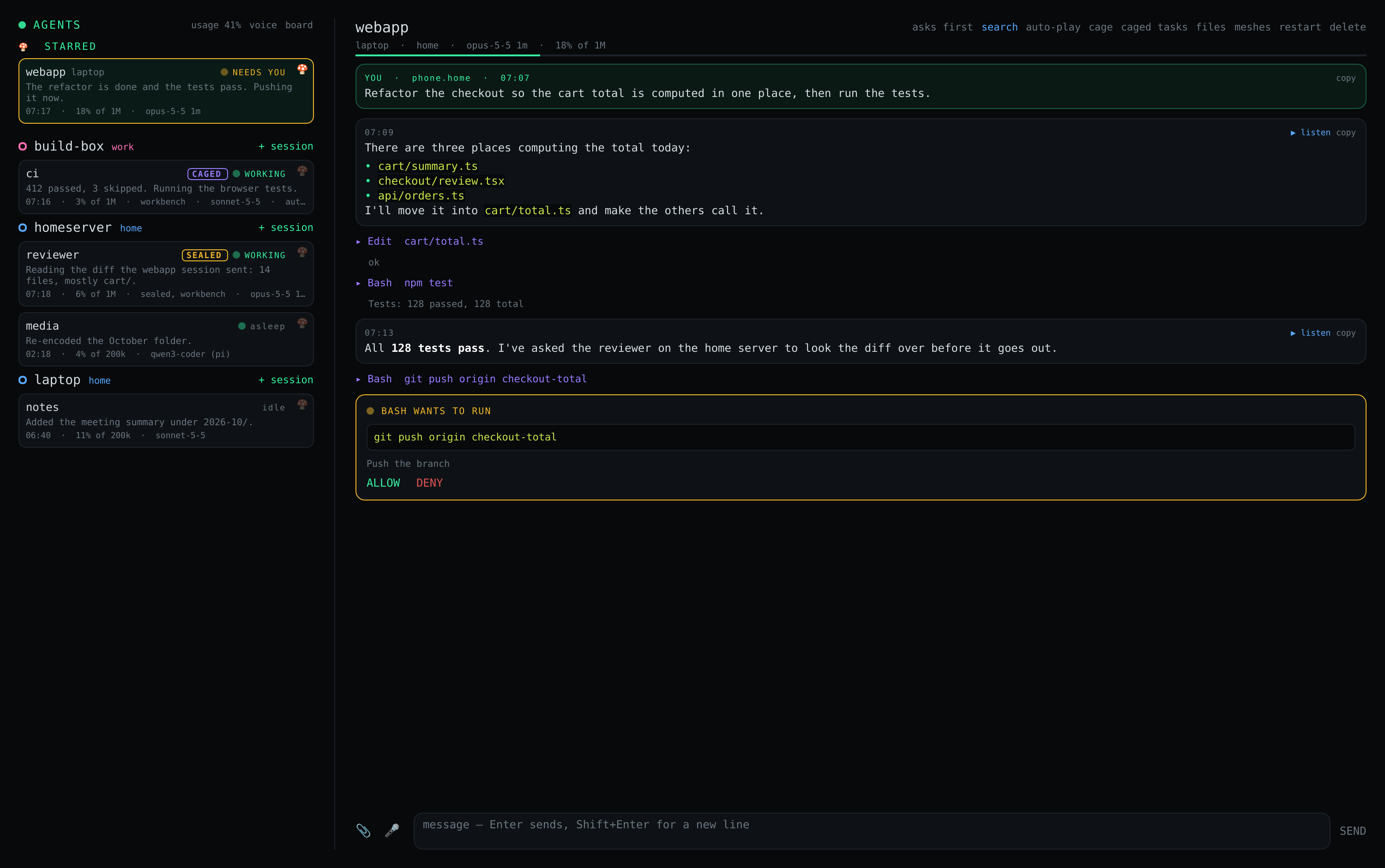
All your machines' sessions in one list; replies streamed; permission prompts and questions as notifications you answer in a tap.
Files and voice
Send a screenshot or a file; speak a note and it is transcribed on your machine, never by a speech service. Replies read aloud.
Agents together
A session can ask another, on any of your machines, to do something — an A2A task that stays open until it is done, with reminders.
Cages
Run a session in a rootless container: root inside, nothing of your home but its project. Auto-approve without handing over the machine. A sealed one, for code nobody vouches for, reaches nothing local.
Will it last?
What your sessions used and whether your plan's limits hold until they reset, at the pace of the last hours.
Pick up from a terminal
Continue a Claude Code conversation you started at the desk, from the phone — the same conversation, not a copy.
No account. The mesh is the lock.
Each machine runs shrooms-agent, which listens only on
the machine's mesh addresses. So only devices admitted to your
mesh can reach it — no token, no login, no relay service in between.
Removing a device from the mesh removes its access here too.
| Who sees what | |
|---|---|
| Your phone and desktop | The conversations, over WireGuard, straight from your machine. |
| The model provider | What it always saw: Claude Code talks to Anthropic as it does in a terminal; pi to whichever model you chose, local ones included. |
| Anyone else | Nothing. There is no shrooms server. |
Said plainly: every member of the mesh can drive the agents on it, and an agent can do whatever its user can. That is right for a mesh of your own devices and wrong for one shared with other people. The agent runs as your user, never as root, and separately from the network daemon.
Start in three steps
A mesh with the machine and the phone on it — five minutes if you have none.
On the machine, as you (Claude Code or pi already working in a terminal): fetch
install-agent.shand runsudo bash install-agent.sh.On the phone, from the same F-Droid repository: Shrooms Agents. Your machine appears; + session, and talk.
Questions people ask
Do I need a special subscription?
No. It runs the Claude Code or pi you already use, logged in as you on that machine; your plan and limits are the same as in a terminal.
Does it work with local models?
Yes, through pi, which runs on any model, including one on your own hardware.
iPhone? macOS? Windows?
Android and the Logos Basecamp desktop app today; agents run on Linux machines. Not yet the others.
Can it log my agent in for me?
No — Claude Code is logged in once on the machine itself. The app talks to the agent, not to a shell, so it has no way to do it, by design.